
What's new
Sage X3 Cloud portal 1.8.0
-
Resource Center available from the Partner Portal:
The ? help icon now opens the in-portal Resource Center, providing direct access to product resources without leaving the Partner Portal.
-
Deployment-specific upload file size configuration:
You can now configure the maximum upload file size (nodelocal) for each deployment from the Configuration tab.
-
Bug fix – User creation with uppercase email addresses:
Fixed an issue that displayed an error message during user creation when the email address contained uppercase characters. Users are now created successfully, and the portal redirects you directly to the user details page after creation.
Sage X3 Cloud portal 1.7.2
-
Bug fix – Improved New Relic monitoring:
Fixed an issue that prevented the Last hour metrics from displaying on the deployment monitoring page in some cases. The issue occurred when the associated New Relic dashboard page could not be found after recreation.
Sage X3 Cloud portal 1.7.0
-
FTP password expiration:
FTP user passwords can now be configured to expire after a defined period. When a password expires, the user must obtain a new password from an administrator before accessing FTP again.
By default and for already existing users, passwords expire after one month.
-
X3 services add-ons management from the Cloud Portal:
You can now build, activate, deactivate, and roll back X3 services add-ons directly from a dedicated X3 services builds tab. The portal also provides compatibility warnings and build logs to help you validate and troubleshoot add-ons.
-
Deployment history search:
You can now search deployment history entries by template, patch title, file name, tag, version, folder, or date to quickly find relevant records.
-
Improved deployment detail page refresh behavior:
The deployment detail page no longer refreshes automatically while an operation is in progress. The page now refreshes only when you select a tab or use the Refresh: action.
Sage X3 Cloud portal 1.6.0
-
Display the BI solution used by deployments:
Deployment pages now display the BI solution configured for each deployment.
The following enhancements have been added:
-
The deployment detail view displays the BI solution selected during provisioning in the BI integration tab.
-
A new BI tool column has been added to the deployment list.
-
Supported values are: SEI, ZAP, or None.
-
The Locale column has been removed from the deployment list to optimize space.
-
-
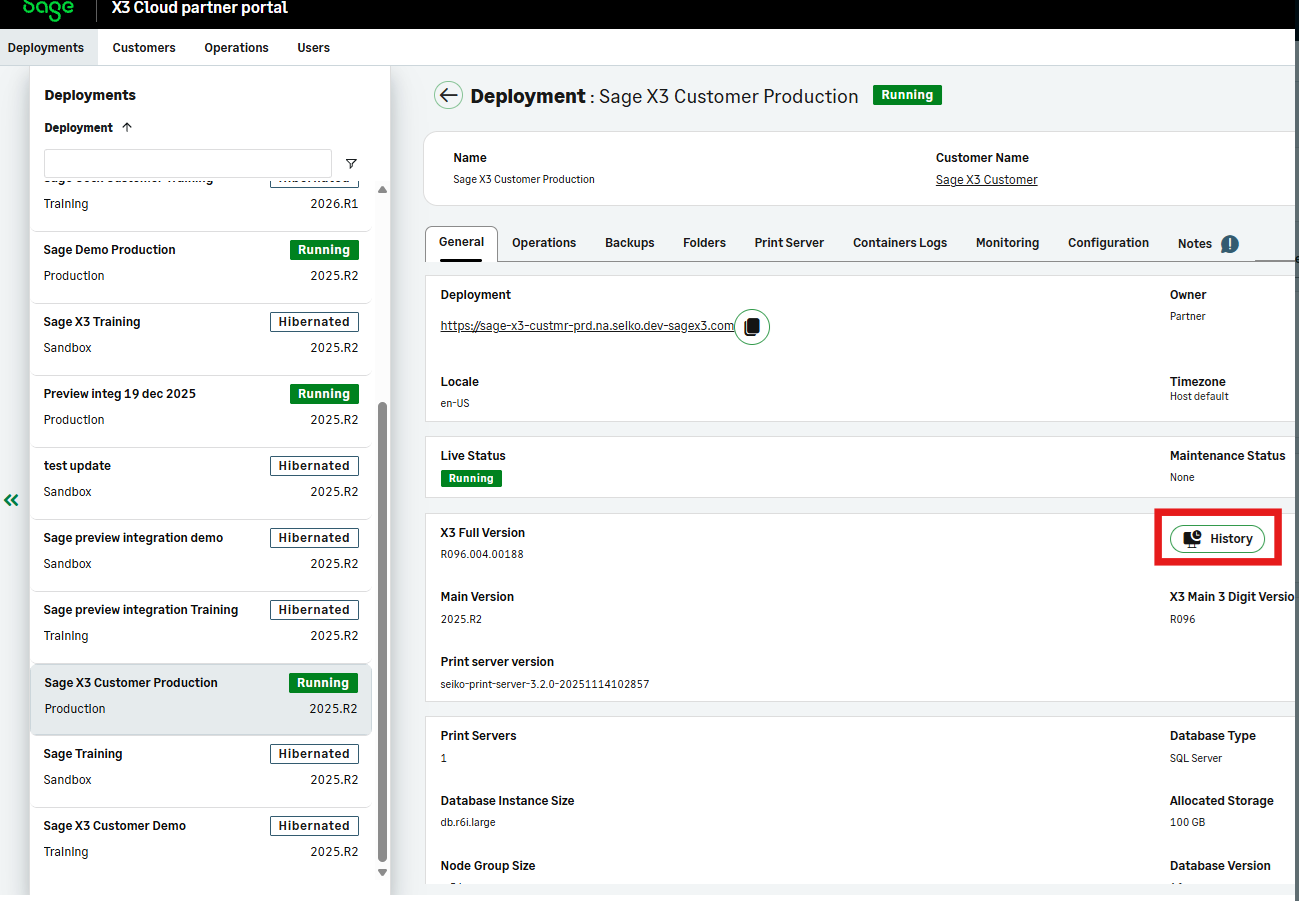
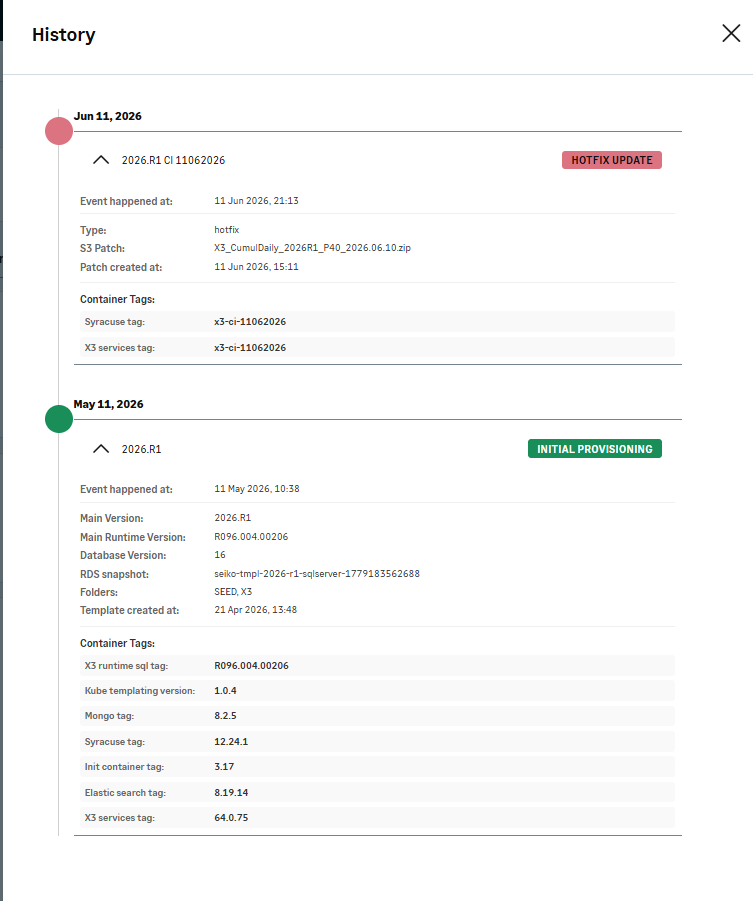
Display deployment history information:
Deployment pages now provide historical information to help track the deployment lifecycle over time.


The following information is now available:
-
Original provisioning template information
-
Deployment creation date
-
Applied patch information, including:
-
This historical information remains available even if the related templates or patches are deprecated or deleted.
-
-
Validate folder names:
Folder names that start with a number are now blocked.
This modification prevents X3 import errors caused by invalid folder names, such as 4Cad.
Sage X3 Cloud portal 1.5.0
-
Update your profile details directly in the portal:
Partners can now update their own profile information (such as name and language) without affecting their role, status, or email.
-
Enhanced Lead role:
The Lead role has been enhanced. Lead users now have broader permissions to manage users and customer access, while key administrative actions remain limited to Admins users.
-
Improved deployment page experience:
Deployment pages have been enhanced with clearer status indicators, additional tooltips, and better visibility of key actions.
-
Restrict user access to selected customers:
You can now limit a user’s access to a subset of customers. The user will only see the assigned customers and their associated deployments across the portal.
-
Enhanced FTP security with account lockout:
FTP user accounts are now locked out after repeated failed login attempts. Administrators can unlock users from the portal with a new password and audit trail.
Sage X3 Cloud portal 1.4.0
-
Create your X3 user from the Cloud Portal:
Available for deployments running X3 2026 R1 or later.
You can now create your own X3 user directly from the Cloud Portal using a new deployment action, without manual configuration in X3.
-
Print server settings configurable from the Cloud Portal:
You can now update print server settings per deployment, with validated ranges and persisted overrides, and apply changes through a controlled restart.
Available for both production and non‑production deployments.
Sage X3 Cloud portal 1.3.0
-
Improved folder import validation:
The system now prevents corrupted folder records by blocking imports where the SVG folder name is incorrect.
-
Privacy preferences available in Your profile:
You can now revisit and update previously approved consent settings directly from Your profile > Privacy preferences.
-
Localized welcome email and resend option:
Newly created partner users receive a localized welcome email. Administrators can resend the welcome email from the user actions menu.
-
Database access management for non-production deployments:
On non-production deployments, you can now activate or deactivate database access, retrieve or rotate credentials, and generate connection commands through our new interface.