
How to upgrade to MongoDB 7
MongoDB version 7 can be used with Sage X3 Syracuse Server version 12.21.0.
Important: You must be running MongoDB 4.4 to upgrade to MongoDB 7.
Sage delivers a MongoDB setup to upgrade your MongoDB instance.
Consult the MongoDB 7 documentation for more information.
Prerequisites
For each release, the minimum Syracuse upgrades compatible with MongoDB 7 are the following:
| Product version | Minimum Sage X3 Syracuse Server version |
|---|---|
| U9 | Not compatible |
| V11 | Not compatible |
| V12 | 12.21.0 |
Consult the prerequisites documentation for MongoDB 7 on Linux and Windows for more information.
Upgrading MongoDB from an earlier release than 4.4
Consult this documentation if you need to upgrade to MongoDB 4.4 first.
Upgrade process from MongoDB 4.4 to 7
- Stop the Sage X3 Syracuse Server Agent. It is mandatory to not have MongoDB client running. Check that you don’t have any node.js nanny, Nx, Wx or B0 running.
- Consult the documentation for what to take into consideration before launching the MongoDB 7 setup.
- Launch the MongoDB 7 setup to start the upgrade process. Follow the installation procedure.
- If the original installation was set only to accept secure connections, pay attention to The server uses
and accepts only SSL encrypted connections option.
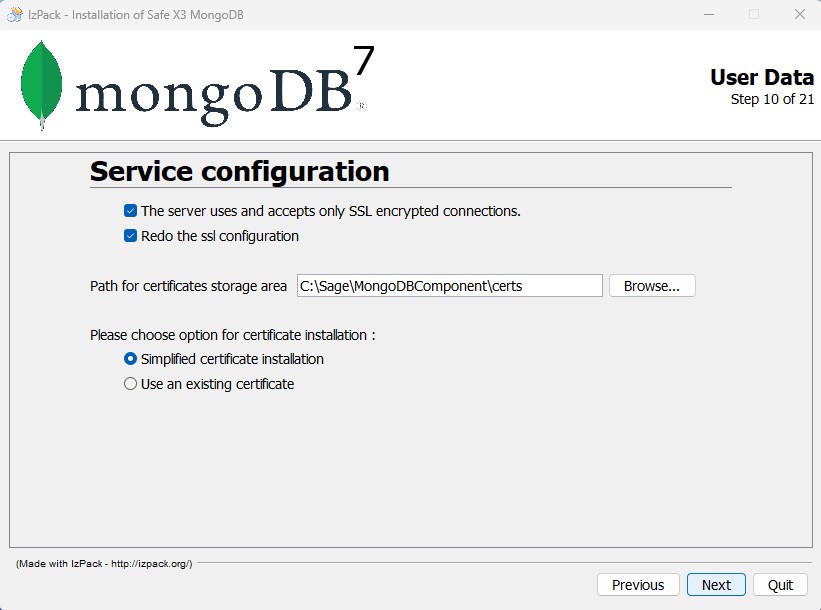
- During the upgrade, the setup executes the following migration process:
- The MongoDB service is stopped.
- MongoDB 7 binaries are installed. Note : The binaries of MongoDB 4 and 7 coexist in the disk in different directories.
- A Powershell script dedicated to the MongoDB migration will be executed and follow these steps:
- Exports a dump using V4 binaries.
- Creates a backup of the previous database file system structure into a temporary location.
- Creates a new MongoDB 7 empty database.
- Imports the previously done dump of MongoDB 4 into the newly created MongoDB 7 database.
- Copies old database and dumps into a backup directory.
- A log is generated on the disk in the main MongoDB installation folder.
- Consult the documentation for what to take into consideration during the upgrade process.
- Restart your Sage X3 Syracuse Server.
- Consult the documentation for what to take into consideration after the upgrade process is concluded.
Additional notes on upgrading MongoDB 4.4 to MongoDB 7
Before upgrading to MongoDB 7
Before upgrading from MongoDB 4.4 to MongoDB 7, take these notes into consideration:
-
Clear the MongoDB cache.
-
Make sure before you launch the setup, there's at least two times the size of the current database of free disk space.
-
If you are using a Java Oracle platform and if the MongoDB server uses an SSL connection, you need to make sure the system has at least Java 11 installed.
-
You need to purge and clean big objects stored in the MongoDB database. This will reduce the size of the database to migrate.
Note :If the customer executes the purge, it is normal to not see any immediate benefits due to database fragmentation. This issue will be solved automatically during the migration process.
-
The replica set feature is not handled by the migration tool. The migration of replica sets needs to be done manually.
-
The sharded cluster feature is currently not handled by the current architecture of Sage X3 Syracuse Server.
-
The duration of the migration is impacted by the resources of the server where MongoDB is installed and by the size of the database.
-
When you start the migration process, the process can't be reversed. This is due to the setup detecting a previous installation of MongoDB and trying to update it before executing the migration at the end of the process using a dedicated Powershell script.
While upgrading to MongoDB 7
During the upgrade procedure from MongoDB 4.4 to MongoDB 7, take these notes into consideration for possible troubleshooting during the migration that occurs during the process:
-
It can be important to look at the following log files generated by the Powershell migration script:
-
Migration setting file (
migration-7-0.ini) -
Timestamped log file (
migration-tools.log)
The migration setting file and timestamped log file are located in the MongoDB installation folder.
-
-
If you encounter an error during the migration, the information stored in the timestamped log file can provide context to the error and provide you with instructions to solve it.
-
If an error occurs during the migration, a manual migration needs to be executed. Follow the instructions described in the log file concerning the manual installation.
After upgrading to MongoDB 7
After the upgrade to MongoDB 7 is concluded, take these notes into consideration:
-
In the
update_backupdirectory located within the MongoDB installation folder, you can find the data of the MongoDB database before the upgrade together with the dump of the database before the migration. If after a certain time, the migration is validated, the content of this directory can be archived or purged.