
Stock image flows
Creation rules
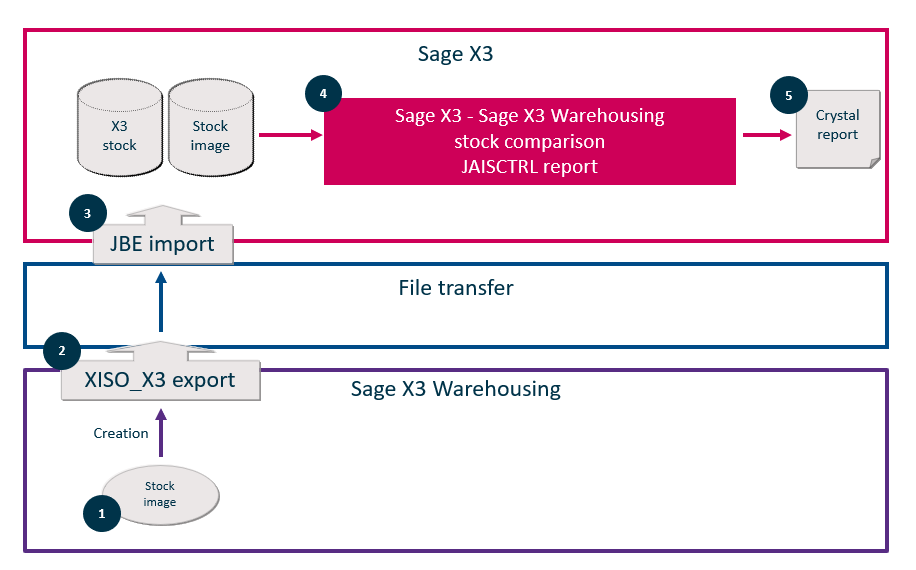
The Sage X3 Warehousing stock image is generated at a given time, which can be set up (for example, at 00:01).
The stock comparison launched in Sage X3 is used to compare the Sage X3 Warehousing stock image with the Sage X3 stock image, which is extracted when launching.
The JAMVTDAT - Stock image after mvts of day general parameter (Yes/No) of the connector is used to define if the day's movements should be included or not. These are the movements performed between 00:01 and the time when the Sage X3 / Sage X3 Warehousing stock comparison is launched.
The Sage X3 Warehousing stock image provides a view of the stock at a given time. If you include the movements performed in Sage X3 between that time and the comparison launch time, you will get "standard" variances as a result.
The stock image data is generated in the JAISCTRL report. The parameters of this report include:
-
The stock image number
-
The product details (Yes/No) (those details are the lot number and stock status)
-
Only products with a stock variance (Yes/No)
Stock overview
The Sage X3 Warehousing stock can be viewed in Sage X3 in the Products-sites function (GESITF), Calculated data section, WMS available stock block:
-
The number of products for stock status A is displayed in the Authorized block.
-
The number of products for stock status Q is displayed in the Control block.
-
The number of product for stock status R is displayed in the Rejected block.