
Processing cost accruals at fiscal year end
The objective of this stage is to generate the automatic posting of purchase accruals from not received supplier invoices when the invoicing period is different from the fiscal year. This process can be carried out at the end of each month, quarter or fiscal year. It is used to generate recurring purchase accruals.
Function
- Accruals (CPTSVC)
Activity code
- SVC – Accruals
- FRADGI – French fiscal regulation (TC chapter, CPT group)
- GAUCCA – Expense accruals journal (CPT chapter, CLO group)
- SVCCLOPER – Accruals in closing period (CPT chapter, CLO group)
You can perform this step before or after:
- Closing or carrying forward not closed purchase requests and orders.
- Carrying forward not closed precommitments and commitments.
If an invoice has been posted on fiscal year N but covers a period that crosses over fiscal years N and N+1, during closing N, it will be necessary to enter the amount corresponding to period N+1 as a purchase accrual.
In order to know the provision to be registered, the period covered by the provided service (period start and end date) will need to be specified for each invoice line when entering the invoice.
The following procedure concerns the process of purchase accruals at the fiscal year end in the context of an operating budget closing.
Function overview
Open: Financials > Closing processings > Accruals
In this function, you can:
- Select the receipts to process.
- Specify the expected accounting generation mode.
Prerequisites
Creating purchase accruals implies that an approved envelope, budget and budget line, which correspond to the original envelope of the invoice, exist on the new fiscal year.
This function is not compatible with the value of the ITAPRE - Analytical apportionment parameter ( LOC chapter, ITA group), which depends on the KIT activity code.
For multi-annual envelopes
The envelope and budget must exist. The budget must contain an approved budget line with the same characteristics as the original budget line of the invoice.
If this is not the case, the creation of the purchase accrual will be rejected and signaled by a message in the log file.
For annual envelopes
It is possible the envelope does not exist. The envelope exists if it has been created by renewal or by Carry-forward of not closed commitments (if they have been created before the process of Purchase accruals).
If the envelope does not exist on the new fiscal year, the creation of the purchase accrual is impossible. The following warning message is displayed: 'Validity limit exceeded, envelope not renewed'.
If the envelope has been created by renewal or carry-forward, the creation process of purchase accruals will search for the code of the new envelope. Secondly, it will search in the envelope for a budget and a budget line set to 'Final' and equivalent to the original budget line.
If all these elements exist, the purchase accrual will be generated. In the opposite case, the creation will be rejected and signaled with a message specifying the origin of refusal in the log file.
Selecting purchase accruals
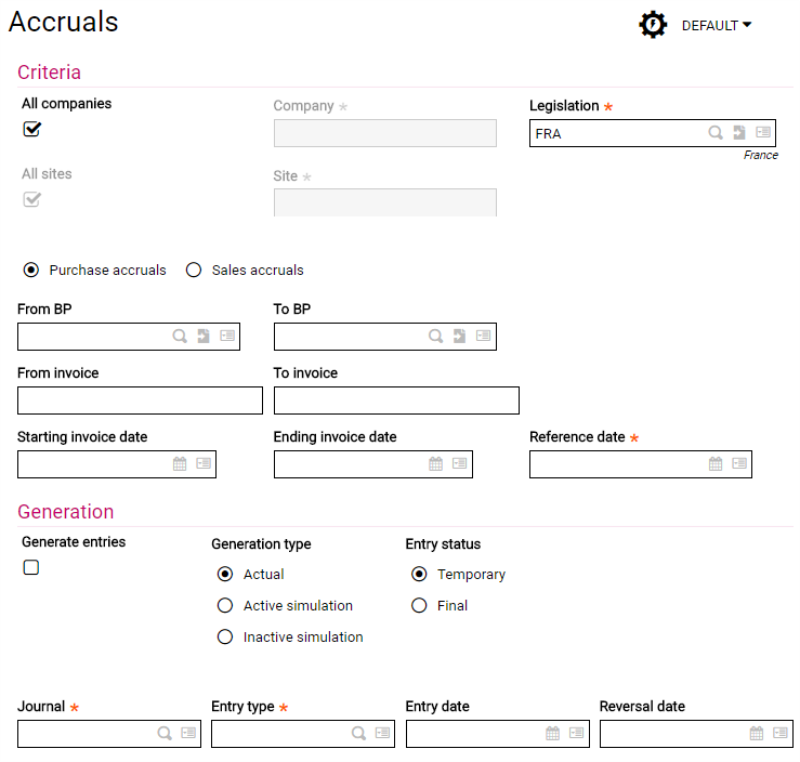
Selection criteria
All companies
If you select this check box, the process will be carried out for all the companies of the folder.
In a multi-legislation environment (LEG activity code active), the box is cleared and disabled; the process can only be launched company by company because the document type and the entry journal are potentially of a single-legislation nature.
When you clear this check box, you must enter or select the code of the company to which the process applies.
All sites
If the selection concerns all the companies, this check box must be selected. If the selection concerns a single company and the check box is selected, the process will be carried out on all the sites associated with the company.
When you clear this check box, you must enter or select a site associated with the entered company: the process will only be carried out on this site.
Purchase accruals / Sales accruals
These fields define whether the process is for Purchase Accruals or Sales Accruals.
BP range
These fields are used to select a supplier range defined by the entry of start and end references.
Invoice range
These fields are used to select a supplier range defined by the entry of start and end references.
Invoice dates
These fields are used to select an invoice date range defined by the entry of start and end references.
Reference date
You can enter a pivot date from which the accruals will be taken into account. It often is the closing date of the fiscal year or a period end date. For each of the invoice lines scanned by the process, the reference date is compared to the start and end dates of the services in order to calculate the provision to register.
Only the posted invoices containing lines with service period dates are selected.
Accounting journal entry generation type
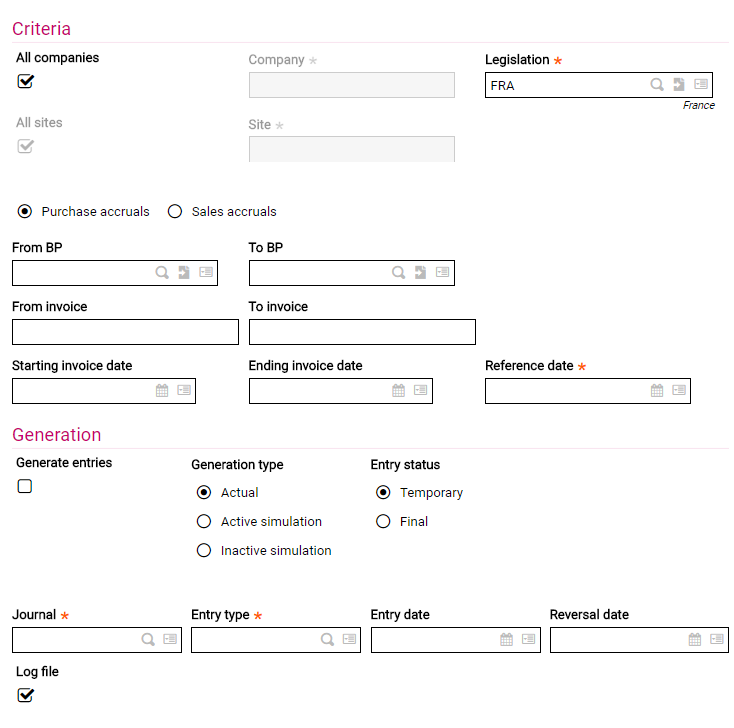
Defining posting terms for purchase accruals
Generate entries
Entries are generated if the 'Generate entries' check box is selected. If this check box is cleared, the process switches to simulation mode.
Generation type
Actual
It is possible to inquire and print (GL, Balance, etc.) an actual accounting journal entry. Then, you can decide if the status of this actual journal entry is temporary or final.
Active simulation / Inactive simulation
Once active, a simulation journal entry is also integrated to the inquiries and prints. It can be converted into an actual journal or deactivated in order to become an inactive simulation journal (i.e. not displayed in inquiries and reports).
It is possible to first, generate the journal entry in simulation mode, then relaunch the process in actual mode. In this case, the simulation journal entry is automatically deleted and replaced by the actual journal entry.
It is not possible to close a ledger type period until the related simulation postings have been turned into actual or canceled postings.
The status of simulation journal entries can be modified in the CPTVALSIM function: Posting process of simulated entries.
Entry status
When generated in Simulation, the journal must be Temporary: the choice between Temporary or Final on the screen is not significant.
When generated in Actual, you can select the journal entry status: Temporary or Final. This status means that the journal entry can be modified:
Most of the information of a Temporary journal can be modified. The modification options can vary depending on:
- The nature and origin of the accounting document:
- Provisional payment document: bank line cannot be deleted
- Purchase invoice document: BP line cannot be deleted, purchase account and VAT can be modified
- Management events that have impacted the accounting document:
- Charge account with a declared VAT amount
- Matched, or not, VAT account
Once the journal is Final, the only elements that can be added to it are for information purposes only or concern analytical allocations. The date, amounts, accounts, VAT code and other accounting information can no longer be modified.
Entry type
This is the entry type that will be used to generate purchase accruals and their reversals. The entry type matches the entered entry: customer invoice, miscellaneous operations, collection, etc. The entry type sets the management rules for VAT, reminders, etc. It is one of the key elements when creating an accounting entry.
When the journal entry is generated in Actual mode, the entry type is initialized by the entry type entered on the VCRTYPSVC - Accrual journal type (CPT chapter, CLO group) parameter. You can modify it.
When the journal entry is generated in Simulation mode, the entry type originates from the parameter defined at folder level: The TYPACC — Simulated journal type (TC chapter, INV group) —parameter can be modified.
Journal
Enter the accounting journal code (1 to 5 alphanumerical characters) used to save the journal. It is initialized by default as follows:
When the journal entry is generated in Actual mode, the journal entered on the purchase accrual automatic journal entry is used. If it is not specified on the entry, the journal associated with the journal entry type is used by default.
When the journal entry is generated in Simulation mode, the journal associated with the journal entry type is used.
You can modify it, but the entry of an unauthorized journal code at entry type level is prohibited.
Entry date
Specify the entry date which corresponds to the Purchase accrual. This date must belong to a fiscal year and period open for all ledger types. This is the default reference date.
Reversal date
You can specify a reversal date for the journal entry only if it is generated in Actual mode. In this case, the process of purchase accruals generates two entries: one corresponding to the purchase accrual and the other to its reversal.
The reversal date submitted by default corresponds to the first day of the next accounting period. In a classic operating structure, purchase accruals are generated at the end of the month and reversed at the start of the following month in order to have an end-of-month situation for the receipts that have not been invoiced yet.
Log file
This check box is selected by default and is used to obtain a summary, at the end of the process, of all the journal entries generated by Company, Site and Supplier (purchase accrual, purchase accrual reversals), as well as the various tax-excluding or tax-including totals by Company and Site, with a valuation for each processed receipt line.
You can clear this check box.
Purchase accrual process description
The creation process of purchase accruals is launched by validating the entered parameters by clicking OK.
This process relies on the value of the GAUCCA - Expense accruals journals (CPT chapter, CLO group) parameter.
If this value is not entered, the process uses the purchase accrual automatic journal entry.
It is possible to generate one purchase accrual per invoice, or one purchase accrual per BP according to the chosen option for the TYPGNRSVC - Accrual generation type (CPY chapter, CLO group) parameter.
Purchase accruals creation rules
Purchase accruals (PA) are generated when the period covered by the service overlaps two periods or fiscal years.
Only the posted invoices containing lines with service period dates are selected.
PAs are generated for an excluding-tax amount. Purchase and sales invoice footers are only included in the calculation when they are recovered on the source invoice line (credit memo).
Creating PAs
Purchase accruals are not impacted by the carry-forward of unclosed purchase lines. The creation process of invoice receivables carries out the following:
The cancellation of an expense equal to the purchase accrual amount (provision related to the N+1 period) on the accrual fiscal year.
Reversing PAs
Regardless of the creation time (before or after the carry-forward of not closed purchase lines), the PA reversal on the next fiscal year results in the creation of an expense line in proportion to the accrual related to the N+1 period.
PA impact on purchase detail
On the fiscal year of creation of the PAs, the purchase detail includes a creation line for the PA, which justifies the consumed amount of the budget line.
On the PA reversal fiscal year, the purchase detail includes a reversal line for the PA, which justifies the consumed amount of the budget line.
Examples of credits to receive creation rules
Creating purchase accruals before the carry-forward of unclosed commitments
|
PA before carry-forward |
Amounts |
BL N | BL N+1 | ||
|---|---|---|---|---|---|
| Committed | Achieved | Committed | Achieved | ||
|
(1) Order |
100 |
100 |
|
|
|
|
(2) Invoice N (service provided on N+1) |
80 |
-80 |
80 |
|
|
|
(3) PA creation |
80 |
|
-80 |
|
|
|
(4) PA reversal |
80 |
|
|
|
80 |
|
(5) Carry-forward of commitments |
20 |
-20 |
|
20 |
|
|
Sub-total |
|
0 |
0 |
20 |
80 |
|
(6) Receipt |
100: |
|
|
|
|
|
(7) Invoice N+1 (service provision on N+1) |
20 |
|
|
-20 |
20 |
|
Total |
|
0 |
0 |
0 |
100 |
Creating PAs after the carry-forward of unclosed commitments
|
PA after carry-forward |
Amounts |
BL N | BL N+1 | ||
|---|---|---|---|---|---|
|
Committed |
Achieved |
Committed |
Achieved |
||
|
(1) Order |
100 |
100 |
|
|
|
|
(2) Invoice N (service provided on N+1) |
80 |
-80 |
80 |
|
|
|
(4) Carry-forward of commitments |
20 |
-20 |
|
20 |
|
|
(5) PA creation |
80 |
|
-80 |
|
|
|
(6) PA reversal |
80 |
|
|
|
80 |
|
Sub-total |
|
0 |
0 |
20 |
80 |
|
(6) Receipt |
100 |
|
|
|
|
|
(7) Invoice N+1 (service provision on N+1) |
20 |
|
|
-20 |
20 |
|
Total |
|
0 |
0 |
0 |
100 |
The provision is calculated as follows:
- Reference date = D1
- Service start date = D2
- Service end date = D3
- If reference date (D1) is prior to service start date (D2):
- an accrual for the excluding-tax amount of the invoice line is recorded.
- If reference date (D1) is included between, or equal to, service start date (D2) and service end date (D3):
- an accrual is defined for an amount equal to:
- (Excl. tax amount of the invoice line * Number of days included between D1 and D3) / Number of days included between D2 and D3.
- If reference date (D1) is prior to service start date (D2):
- This formula can be simplified to the following expression: (Excl. tax amount of the invoice line * [(D3-D1)] / [(D3-D2)].