
Step 3: Mandates and payment entries
Concept
The purpose is to establish a link between the payment entry and the mandate when the open items contain a mandate reference.
The payment entry corresponds to the DirectDebitTransactionInformation block of the XML message. The SEPA requirements must be considered during the payment entry creation.
- Payment receipt/entry (GESPAY)
- Payment proposal (PAYPROPAL)
- Imports (GIMPOBJ)
- Customer allocations (IPTACPTCLI)
Payment receipt/entry (GESPAY)
Open: A/P-A/R accounting > Payments > Payment/Receipt entry
Any payment entry is considered to be a SDD payment in the scripts and functions of SageX3 when the selected payment entry transaction has the SEPA generation flag and the Revenue sign.
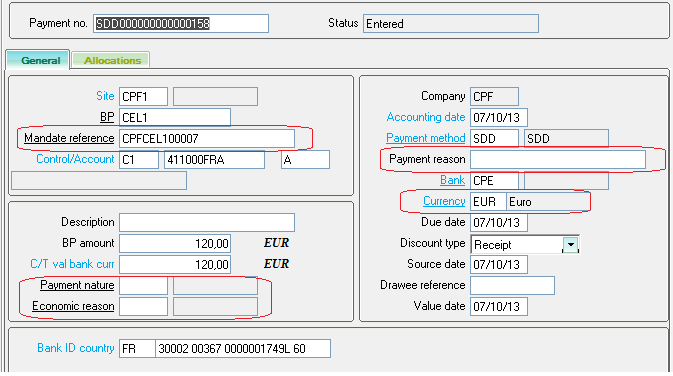
To create a payment entry, enter the following information:
-
General section: enter the payment entry characteristics
-
Site
-
Pay-by (debtor)
-
Mandate reference
-
Bank account…
-
-
Allocations section: enter the open item lines
-
-
Mandate reference:
-
Accessibility
-
The Mandate reference field is managed only if the SDD activity code is set to Yes. Otherwise, the field is hidden.
-
If the SDDMGT - SDD management general parameter is set to Yes for the company, and the payment type is SDD, the field is initialized and can be modified.
-
If the SDDMGT - SDD management general parameter is set to Yes for the company, and the payment type is not SDD, the field is hidden.
-
If the SDDMGT - SDD management general parameter is set to No for the company, and the payment type is SDD, the field is empty and it cannot be accessed.
-
The mandate reference code cannot be changed when the payment is posted.
-
-
Mandatory
-
If the payment entry type is SDD, the Mandate reference code is mandatory.
-
A payment entry cannot be created if the Mandate reference field is required and not populated.
-
-
Status
-
A payment entry that has been created or updated must be associated with a mandate having the Approved status. Otherwise, it will not be possible to create or update this payment entry.
-
Conversely, a payment entry can be posted or booked even if the mandate has moved to an unauthorized status.
-
-
Initialization
-
The Mandate reference field is automatically initialized if there is a default mandate with an approved status for the Company/Pay-by customer combination.
-
If not, the user must select an existing mandate with an approved status for this combination.
-
If the company or the pay-by customer is changed, the mandate reference code is re-initialized with the same rules as above.
-
If the mandate reference code is empty, the first open item with a mandate reference that will be selected will be used to populate the Mandate reference field.
-
-
-
Address code
-
After the selecting of the mandate reference, the system displays the address code related to the mandate and this field becomes non-modifiable.
-
-
Payment nature
-
This field is linked to miscellaneous table 313.
-
It is displayed only for an open payment entry transaction with the SEPA format and defines the nature of the SEPA movement.
-
-
Payment reason
-
This code corresponds to the 'Remittance information' data from the ISO 20022 standard messages.
-
This field can be entered when the payment is associated with a payment transaction that can be carried out through SEPA. It can be used to enter a reason for each payment (maximum length = 140 characters).
-
-
Economic reason
-
Information relating to the Banque de France: Miscellaneous table 309 This field is no longer required since the beginning of 2012.
-
-
Bank
-
The country of residence for the bank/branch of the account to credit must belong to the SEPA area ([F:BAN]CRY).
-
-
Currency
-
Only EURO currency is authorized. This field is not editable.
-
The currency of the open items can be different from Euro.
-
-
Due date
-
If this field is displayed, the system applies the following controls:
-
Blocking error: the due date of the payment entry must be later than the mandate signature date.
-
Warning errors:
-
The due date for the payment with a first sequence (FRST) must be prior to the next payment date (RCUR).
-
The payment due date must be prior to the date of the payment with a final sequence (FNAL).
-
-
-
-
BP Bank account
-
After the selecting of the mandate reference code, the system displays the banking information for the BP related to this mandate. The field can no longer be modified.
-
-
-
-
It is not possible to select an open item with no mandate reference.
Exception: the prepayment open items are not concerned by this constraint. -
The selected open items must have the same mandate reference code as the header tab.
Exception: the prepayment open items are not concerned by this constraint. -
It is possible to create a SDD payment with no allocation line.
-
Payment proposal (PAYPROPAL)
Open: A/P-A/R accounting > Payments > Payment proposals
Use this function to import the payment entries by an automatic processing.
- If the selected payment or payment mode type is SDD, the payment currency must be EURO.
- If the selected payment or payment mode type is SDD, the bank code is mandatory.
- The system controls that the country of residence for the bank/branch of the account to credit must belong to the SEPA area ([F:BAN]CRY)
Process
- The Mandate reference field is managed only if the SDD activity code is set to Yes.
- If the SDDMGT - SDD management general parameter is set to Yes for the company, the process applies the same controls as for a manual creation, according to the SDD requirements.
- If a record does not comply with the creation rules, it is rejected.
- The log file displays the records that have been rejected and the reasons of the rejection.
Import of an SDD payment entry (GIMPOBJ)
Open: Usage > Imports / exports > Imports
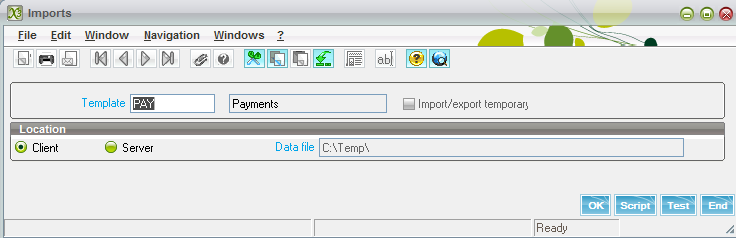
Use this function to import the payment entries by an automatic processing.
Process
- The import process applies the same controls as those used for manual creation, according to the status of existing mandates in the database.
- If the SDD payment entry does not comply with the import rules, it is rejected.
- The log file displays the records that have been rejected and the reasons of the rejection.
- It is not possible to update a payment entry by import.
Impacts
SDD sequence
When creating the payment entry, the system assigns a sequence to the SDD payment according to the payment type of the mandate (One-off or Recurring), the previous payment entries and the number of direct debits if specified.
The sequence represents the SDD instruction about the direct debit order:
- OOFF (one-off) for a single mandate,
- FRST (first) – RCUR (Recurrent) – FNAL (final) for a series (recurring mandate).
If the mandate reference code is changed, the system updates the sequence with the same rules as above.
The mandate status is updated according to the payment type of the mandate and the allocated sequence.
- With an OOFF sequence presentation, the mandate status moves to Expired.
- With a FRST and RCUR sequence presentation, the mandate status moves to Approved.
- With FNAL sequence presentation, the mandate status moves to Expired.
Direct debits section
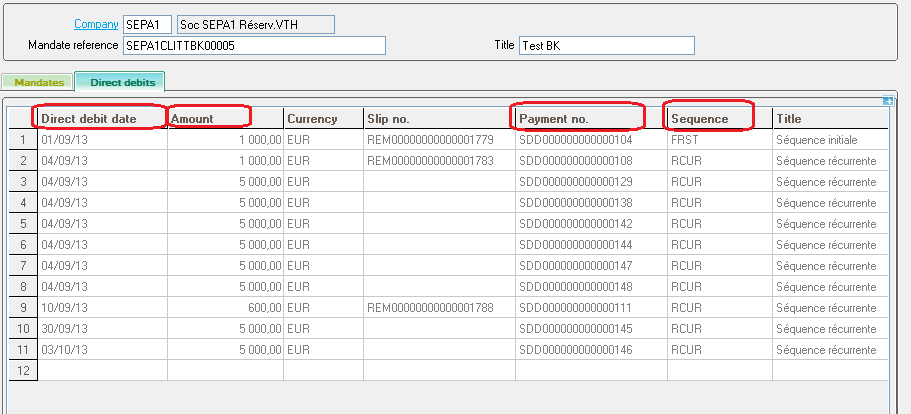
The creation of a SDD payment updates the Direct debits section of the mandate. The system creates a line corresponding to the payment (HISTOMDT table).
If an element of the payment entry is changed or if the payment entry is deleted, the system updates the Direct debits section of the mandate according to these changes.
Customer allocations (IPTACPTCLI)
Open: A/P-A/R accounting>Open items>Customer allocations
Essentially, this function is used in the Financials module for the prepayment cycle.
The payment is received before the invoice is sent: the payment is entered but not linked to an invoice.
After the invoice is created, the payment needs to be linked to the invoice using the prepayment allocation function.
Process
- The posting allows a total or partial deduction of the SDD prepayment from one or more selected orders and/or invoices.
- The posting allows a total or partial deduction of the SDD prepayment without allocation.
- If the SDD prepayment is posted on an invoice, the system checks the consistency of the mandate reference codes.
- The selected invoice (more precisely, the open item of the invoice) and the payment must have the same mandate reference.
- If the SDD prepayment is posted on an order, there is no control on the mandate reference.
Limitations
-
The SEPA rulebooks specify that the the creditor must present SEPA Direct Debit batches to the bank within a certain number of business days before the due date.
SageX3 does not manage direct debit deadlines.
-
When creating payment entries, it is strongly recommended to be vigilant about the due dates so that the sequences and the amendments are sent in the correct order.
The main condition for accepting a recurrent collection is that the first collection must always be received before the recurrent one and that the due date of the recurrent collection is not before the due date of the first collection.
-
It is not possible to create a payment entry with prepayment open item in the Payment proposals (PAYPROPAL) because the mandate reference is required in this processing.
-
It is not possible to create a payment entry without an allocation line in the Payment proposals (PAYPROPAL) function because the mandate reference is required in this processing.