
Step 4: Mandates and remittances
Concept
The purpose is to create a SEPA direct debit remittance.
The remittance corresponds to the Payment Information block of the XML message. The SEPA requirements must be considered during the manual remittance creation.
- Manual remittance creation (GESFRM)
- Automatic remittance creation (GENBORREM)
Manual remittance creation (GESFRM)
Open: A/P-A/R accounting > Remittance > Manual remittance entry
Manual remittance
Use this function to manually group payments linked to the same transaction, bank and company in a single remittance. It is also possible to modify the remittances that have already been created.
To generate a manual remittance, enter the following information:
-
Header: Enter the remittance characteristics
-
Site
-
Bank
-
Payment type…
-
-
Payment section: Select the payments
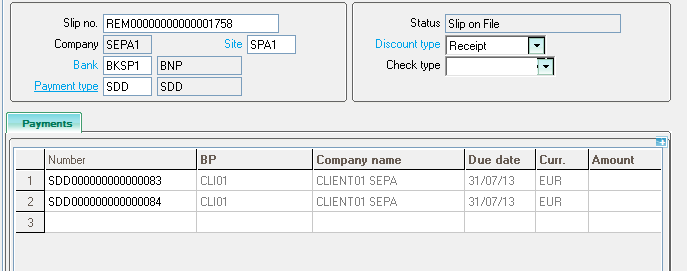
- Conditions:
- The Mandate reference field is managed only if the SDD activity code is set to Yes.
- If the SDDMGT - SDD management general parameter is set to Yes for the company, the system applies the SDD requirements.
- Mandate status: A payment cannot be posted if the mandate status is different from Approved or Expired.
- SDD requirements:
- The remittance is single-due date:
- All receipt entries of remittance must have the same due date.
- The first payment that will be selected will be used to populate the Due date field.
- The remittance is single-currency:
- The user can only select a payment with EUR as the currency.
- Other currencies are forbidden.
- The remittance is only-CI (creditor identifier):
- In Sage X3, we have one CI per company, which means that the remittance is single-company only.
- All payments of the remittance must have the same company.
- The first payment that will be selected will be used to populate the Company field.
- The remittance is single-sequence:
- All payments of the remittance must have the same sequence (OOFF, FRST, RCUR or FNAL).
- The first payment that will be selected will be used to populate the Sequence field.
- The remittance is single-type:
- All the payments have the same type of mandate (CORE, COR1 or B2B).
- The first payment that will be selected will be used to populate the Scheme field
- The remittance is single-due date:
These controls are performed even if the payment is linked to an entry batch.
Bank file action
Click this action to generate the XML bank file.
SEPA file generation
Setup:
- Use the REPBANKDEF - Default file path parameter (TRS chapter, DEF group) to indicate the default path.
- Use the VARFILGEN - Blocking if faulty file user parameter (TRS chapter, AUZ group) to block the generation of the bank file if there is an error on a mandatory field.
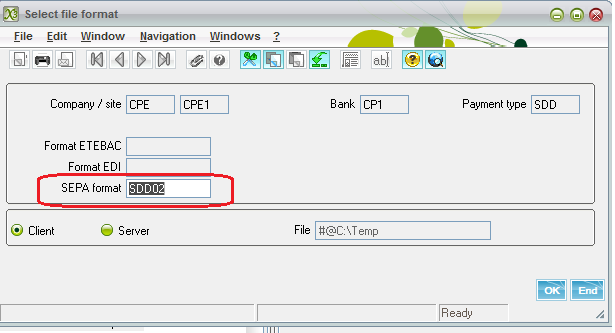
In the SEPA format field, select the SEPA format type.
When generating the bank file, make sure the bank file group set in the selected SEPA format, is the one set in the payment type previously entered in the remittance. Otherwise, an error message is displayed: “Incorrect file structure”.
Automatic remittance creation (GENBORREM)
Open: A/P-A/R accounting > Remittances > Automatic remittance creation
Use this function to generate the remittances by an automatic processing.
Process
- The Mandate reference field is managed only if the SDD activity code is set to Yes.
- If the company has the SDDMGT - SDD management general parameter set to Yes, the process applies the same controls as for a manual creation, according to the SDD requirements.
- The log file displays the records that are created with the due date, the mandate type and the sequence.
Impacts
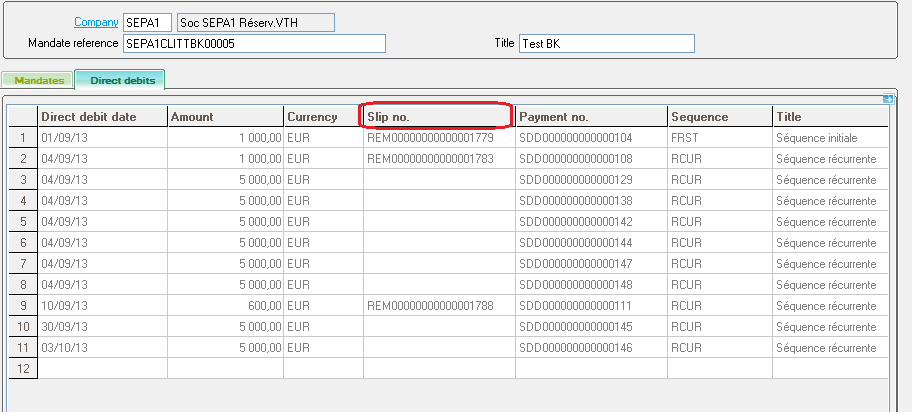
The creation of a SDD remittance updates the Direct debits section of the mandate. The system completes the line corresponding to the payment (HISTOMDT table).
If one element of the remittance is changed or if the remittance is deleted, the system updates the Direct debits section of the mandate, according to those changes.
Limitations
In Sage X3, the remittance corresponds to the Payment Information block of the XML message. The record details correspond to this section of the bank file structure in the Bank File Definition function (GESTFB).
Since, there is no subgroup in the detail record, it is not possible to have a multi sequences and multi schemes remittance.
Instead, several bank files are created according to the different groups.