Setup of the logistics functions Development > Data and parameters |
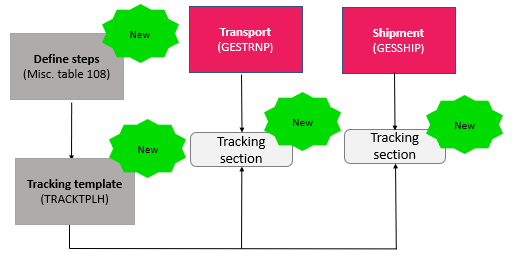
Miscellaneous table 108
(GESADI) | |
Common data > Logistics tables |
Logistical tracking template
(TRACKTPLH) | - To define logistical tracking templates by selecting the different steps. You can:
- Define a step as mandatory or not.
- Create a dependency between two steps.
|
Steps tracking during shipment and transport Purchasing > Shipments |
Tracking section
of: Shipments
(GESSHIP) Transport
(GESTRNP) | - To track the different steps. You have two possibilities:
- Select a logistical tracking template in order to preload a list of steps. You can then modify this list.
- Directly define a tracking by selecting each step manually. For each step, you can:
- Define it as optional or mandatory.
- Enter a due date or an end date. Entering an end date changes the status of the step to Completed. When the status of every mandatory is step is Completed, the tracking status is updated and changes automatically to Completed.
- Define a dependency link between two steps, so that a step cannot be completed until the previous one is.
You can add comments in order to provide additional information.
|
Logistics management functions Purchasing > Shipments |
Shipments
(GESSHIP) | - To fill a shipment with containers or order lines (in bulk).
Steps tracking is available and allows you to define the actions that needs to be carried out during shipment.
|
Transport
(GESTRNP) | - To manage the transport (air, sea, road, rail, multimodal) of multiple shipments with identical points of departure and arrival.
Steps tracking is available and allows you to define the actions that need to be carried out during transport. |