
Cumulative patching
Introduction
From version 2019 R4 (12.0.19), a new system has been implemented in Sage X3 for managing updates. This system applies from version 2019 R5 (12.0.20) and higher.
Principles
Sage now delivers a single archive file that only provides the latest version or latest hotfix level.
By only providing the latest version of each fixed element, the number of patches to install has been considerably enhanced. The easy patching function determines which patches are installed based on the version to upgrade.
The update process is optimized as it only includes the languages and legislations used in the folder. Please note that you may need to update Syracuse and the X3 runtime first (see the guidelines provided in the Installation note). The sequence of operations is as follows:
- The X3 folder is updated.
-
The application folders are updated in parallel. If child folders exist, they are processed after the update of their parent folder is complete.
-
Archived folders are not updated and must be validated once the patch has been run. If not, the following message is displayed in the log of the folder linked to the archived folder: Caution: reference folder SEED has been modified. Relaunch the folder validation for the archived folder HSEED.
The update launch can be scheduled at a given time to meet operating constraints.
A new inquiry function is available for updates (GESAUPD). You can access this function from the Patches menu (Development > Utilities > Patches) to view the details of completed updates. Use this function as the reference for patches and no longer the patch table (which may still be used for custom patches). For specific patches, go to the Patch integration function (PATCH) in Development > Utilities > Patches.
Operating principles
The cumulative patching process only integrates the last version of each component. As a consequence, the update duration is considerably optimized.
Versions Ra, Rb, Rc, Rd, Re, and Rf are consecutive versions that come after version 2019 R4 (12.0.19). They introduce the following enhancements:
- Screen X has been updated and delivered several times with Rb, Re and Rf.
- Script Y has been updated with Rc and Rd.
- Table Z has been updated with Rb.
- Report R has been updated with Rd.
The situation is the following:
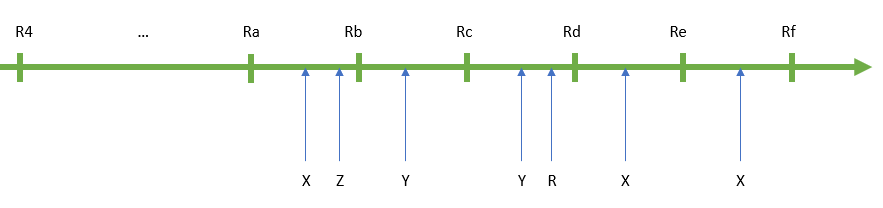
To go from R4 to Rf using classic patches, you would need to process the enhancements as a sequence: screen X would have been integrated and validated three times and script Y twice.
Using the new patching process, the Rf release only includes a single update of screen X, script Y, table Z and report R. This update goes straight to the Rf version, and the enhancements are implemented in an optimized way on all versions from R4 to Re:
- If your current version is 2019 R4 (12.0.19), all the elements are installed once:

- If your current version is Rb, screen X is patched once (from the Rf version), script Y is patched once (from the Rd version) and report R is patched, but not table Z:

- If your current version is Rd, only screen X is patched:




This system only works for version 2019 R4 (12.0.19) and higher. If your current version is 2019 R2 (12.0.17) and you want to update to Rf, which is higher than 2019 R4 (12.0.19), you need to install the following patches:
- The patch for 2019 R3 (12.0.18)
- The patch for 2019 R4 (12.0.19)
- The patch delivered for Rf, which can be applied now that you have installed 2019 R4 (12.0.19).
If your current version is higher than 2019 R4 (12.0.19), you only need to install the patch delivered with Rf.