
Appendix II: Technical specifications
Export setup
The script defined in EC sales types must exist in the script dictionary and contain the export code lines in an $EXPORT_SEL label.
If the script does not exist, you receive a blocking error when trying to create or update an EC sales type.
If the Export script field is empty, the Export action is disabled in the EC Sales List function.
If the script structure is incorrect, such as not including the $EXPORT_ESL label, you receive a blocking error when you try to export.
In the Danish export script ESLEXPDAN, the exported code defines the link between a sales type and the category, Sales of goods, Sales of services and Triangular trading, as defined in EC sales types.
The Danish export file definition specifies the following positions in the detail record of the file:
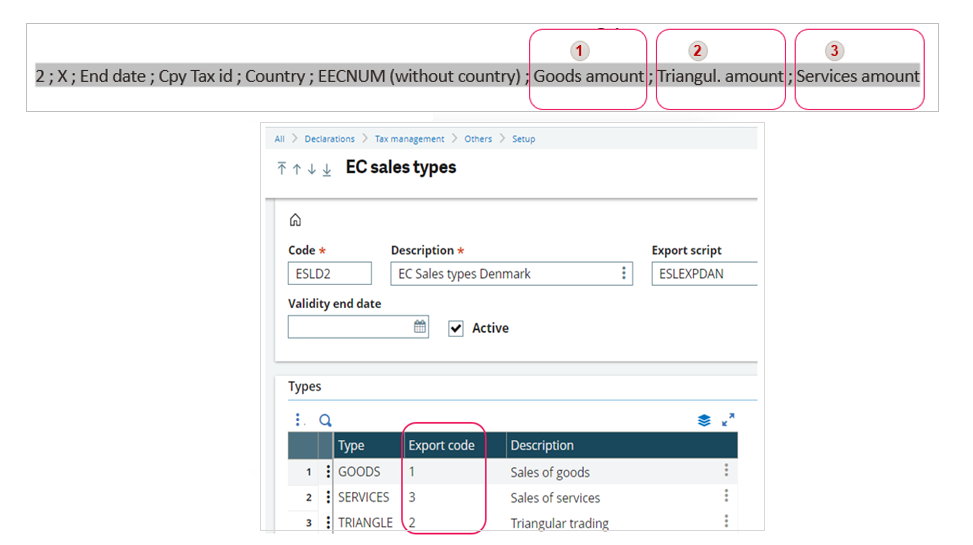
The exported records for each type follow the Danish specifications regarding the position of the amounts:

If the set up includes a SERVICES type with an Export code that is blank or alphabetical in the EC Sales List function, you receive a blocking error if there are any values extracted for that type.
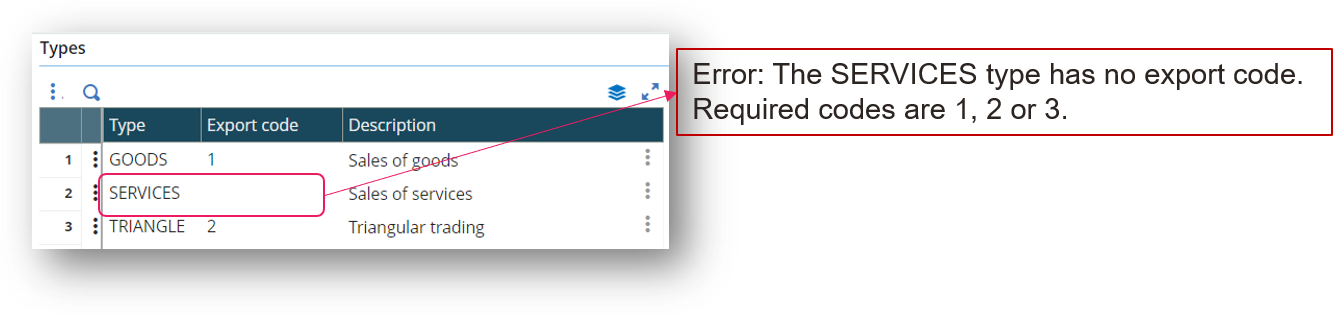
If the Export code field is blank or has a letter value in EC sales types, you receive a blocking error. For the Danish export code, the error alerts you that the code must be 1, 2, or 3.
You can use the same export code for several sales types. In the image below, there are two Sales of goods, GOODS1 and GOODS2.
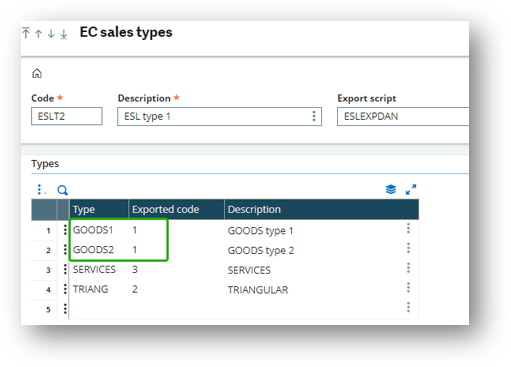
When you export, the extraction for all Results lines, the amounts for Goods1 and Goods2 display in the first position in the export file.

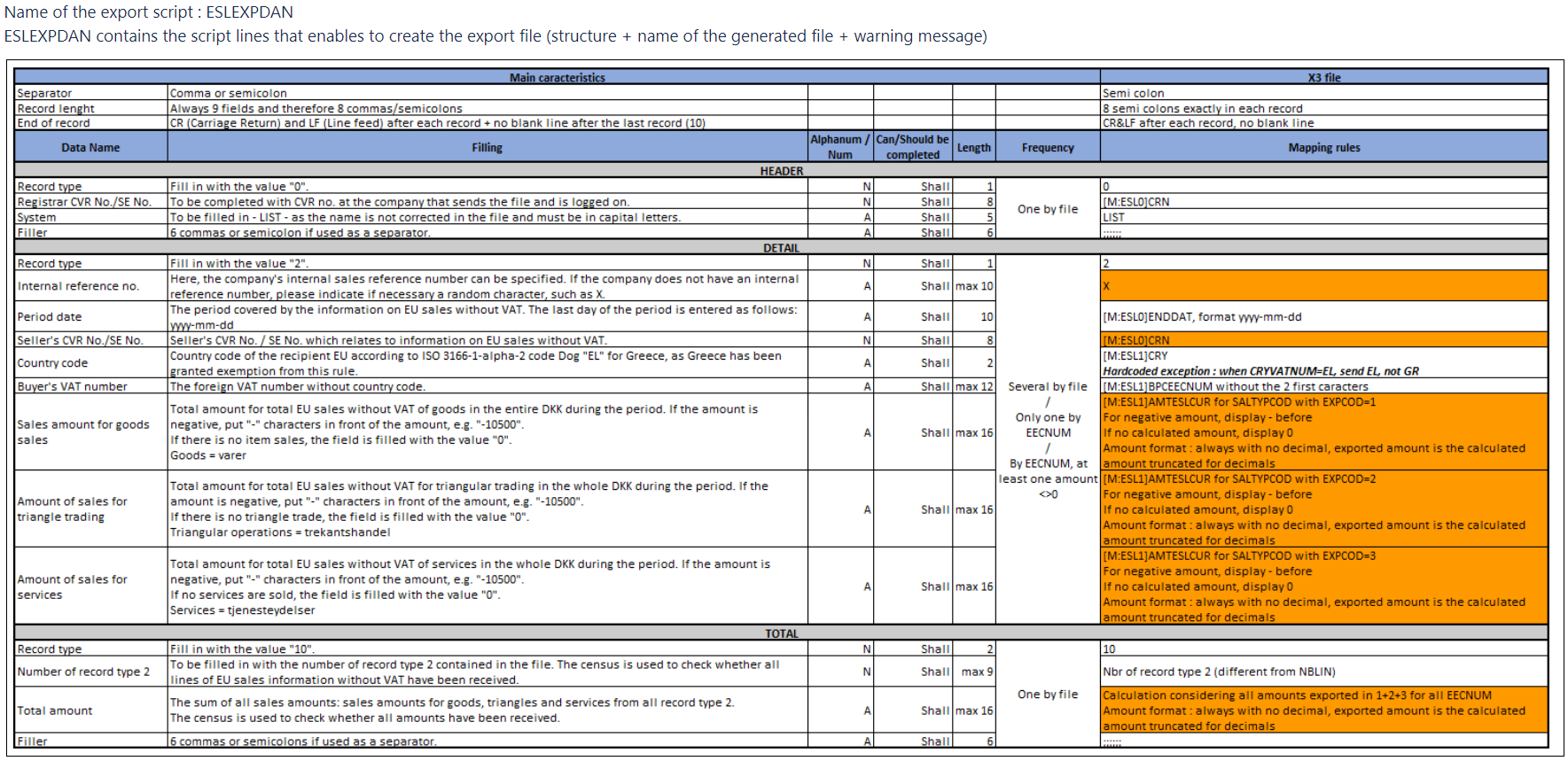
The name, file and records format of the export file are managed in the ESLEXPDAN export script.
File format: csv
File name: ESL - <EC Sales types code> - <VAT entity code> - <End date of the extraction mmddyyyy> .csv
Amounts format: Amounts of the results are exported without decimals
Records format: 3 types of record
Header record
0 ; The Company Tax ID ; LIST ; ; ; ; ; ;
Detail record
2 ; X ; End date ; Cpy Tax id ; Country ; EECNUM (without country) ; Goods amount ; Triangle amount ; Services amount
Total record
10 ; Number of detail lines ; Total of all amounts ; ; ; ; ; ;
File structure (ESLEXPDAN / Denmark)
General description of the extraction process
When data is extracted and displayed in the EC Sales List function, journal entries tables are considered first.
Depending on the Assignment by EC sales types setup, journal entry lines on the main general ledger type are considered for extraction based on:
-
The Entry type used for the journal entry
-
The account entered on the line and the Tax management and Tax allocation field values in the Accounts function (GESGAC)
-
Tax code entered on the line
These journal entries placed in four categories based on their origin:
-
A/R Customer BP invoices (GESBIC) and Customer intercompany invoice (GESBICI)
-
Sales Invoices (GESSIH)
-
Payment entry (GESPAY) posting that includes a discount amount
-
All others created or imported, automatic journal entries, etc.
Based on the origin, additional tables and field values are available as well as the journal entries tables. These additional tables are used to extract and evaluate other relevant information such as:
-
BP tax rule
-
EU VAT number
-
Country
Origin determination algorithm
A/R customer invoices
The journal entry has the Source module set to A/P-A/R accounting ([F:HAE]ORIMOD=3).
The journal entry type and number ([F:HAE]TYP+[F:HAE]NUM) are found in the Invoice table ([F:SIH]GTE+[F:SIH]NUM).
Sales invoice
The journal entry has the Source module set to Sales ([F:HAE]ORIMOD=5).
The journal entry type and number ([F:HAE]TYP+[F:HAE]NUM) are found in the Invoice table ([F:SIH]GTE+[F:SIH]NUM).
Payment posting
The journal entry has the Source module set to A/P-A/R accounting ([F:HAE]ORIMOD=3).
The internal reference of the journal entry starts with PYH and is followed by a payment number NNN, ([F:HAE]REFINT=PYH +NNN), that is found in the Payment table ([F:PYH]NUM).
All the lines of this payment are analyzed and all the linked documents are identified ([F:PYD]VCRTYP + [F:PYD]VCRNUM) and searched in the Invoice table ([F:SIH]GTE+[F:SIH]NUM).
A/R customer invoices or sales invoices are considered.
Other journal entries
This category includes all other journal entry lines that do not meet the criteria described above.
BP tax rule determination algorithm
A/R customer invoice
The BP tax rule is read in the Tax rule field in the Invoice table ([F:SIH:]VAC).
-
If this field contains a value, it persists for the current extracted journal entry line.
-
If this field is empty, the journal entry line is not extracted.
Sales invoice
The BP tax rule is read in the Tax rule field in the Invoice table ([F:SIH:]VAC).
-
If this field contains a value, it persists for the current extracted journal entry line.
-
If this field is empty, the journal entry line is not extracted.
Payment posting
For each and every invoice identified in the payment, the BP tax rule and the EU VAT number are evaluated and the A/R customer invoice or Sales invoice algorithm is applied.
If the same BP tax rule and the same EU VAT number are found for all these invoices, the BP tax rule persists and is used for the current journal entry line.
If not, the BP tax rule is evaluated based on the Other journal entries algorithm.
Other journal entries
With the business partner code determined from the journal entry line, and for the company of the journal entry, the BP/Company grid in the Business partner function (GESBPR) is read when present and its Customer tax rule value is taken into account ([F:BPE]VACBPC).
-
If this field contains a value, the value persists for the current extracted journal entry line.
-
If this field is blank or not present, the related customer record in the Customer BP invoices function (GESBIC) and its Tax rule value is considered.
-
If this field contains a value, it persists for the current extracted journal entry line.
-
If this field is empty, the journal entry line is not extracted.
-
EU VAT number determination algorithm
A/R customer invoice
The EU VAT number is read from the VAT declaration number field in the Sales invoices table ([F:SIH]DCLEECNUM).
-
If this field contains a value, is persists for the current extracted journal entry line.
-
If this field is empty or not present:
-
Then, for the Bill-to customer ([F:SIH]BPR) and its billing address ([F:SIH]BPAINV), the related ship-to-customer record is read and its EU VAT no. is considered ([F:BPD]EECNUM).
-
This value persists for the current extracted journal entry line.
-
-
If this field is empty or not present:
-
The EU VAT no. field for the business partner is read ([F:BPR]EECNUM).
-
If this field contains a value, it is used.
-
If this field is empty or not present, the journal entry line is extracted with no EU VAT number and the error message "BP has no EU VAT ID" displays in the Comment field of the Journal entries section.
-
-
-
Sales invoice
The EU VAT number is read from the VAT declaration number field in the Costing sales invoice table ([F:SIV]BPIEECNUM).
-
If this field contains a value, it persists for the extracted journal entry line.
-
If this field is empty or not present, the EU VAT no. for the business partner is read ([F:BPR]EECNUM).
-
If this field contains a value, it persists for the extracted journal entry line.
-
If this field is empty or not present, the journal entry line is extracted with no EU VAT number and the error message "BP has no EU VAT ID" displays in the Comment field of the Journal entries section.
-
Payment posting
For each and every invoice identified in the payment, the BP tax rule and the EU VAT number are evaluated and the A/R customer invoice or Sales invoice algorithm is applied.
If the same BP tax rule and the same EU VAT number are found for all these invoices, the BP tax rule persists and is used for the current journal entry line.
If not, the BP tax rule is evaluated based on the Other journal entries algorithm.
Other journal entries
-
The EU VAT no. for the business partner is read ([F:BPR]EECNUM).
-
If this field contains a value, it persists for the extracted journal entry line.
-
If this field is empty or not present, the journal entry line is extracted with no EU VAT number and the error message "BP has no EU VAT ID" displays in the Comment field of the Journal entries section.
-
Country determination algorithm
A/R customer invoice
The evaluated EU VAT number, as found by the algorithm, is read:
-
If the EU VAT number has been evaluated:
-
The two first characters are considered and checked in the Country table with the VAT radical field ([F:CRY]CRYVATNUM) to extract the associated country ([F:TCY]CRY).
-
-
If no EU VAT number has been evaluated:
-
The billing address is read ([F:SIH]BPAINV).
-
If this field contains a value, it is used to read the Address table and retrieve the country associated with this address ([F:BPA]CRY).
-
If this field is empty, the customer's default address is determined ([F:BPA]BPAADDFLG=2) and its country is extracted ([F:BPA]CRY).
-
-
Sales invoice
The evaluated EU VAT number, as found by the algorithm, is read:
-
If the EU VAT number has been evaluated:
-
The two first characters are considered and checked in the Country table with the VAT radical field ([F:CRY]CRYVATNUM) to extract the associated country ([F:TCY]CRY).
-
-
If not EU VAT number has been evaluated:
-
The delivery country is read ([F:SIV]BPDCRY).
-
If this field contains a value, it persists for the current extracted journal entry line.
-
If this field is empty, the customer's default address is determined ([F:BPA]BPAADDFLG=2) and its country is extracted ([F:BPA]CRY).
-
-
Payment posting
This follows the same rules a Other journal entries.
Other journal entries
-
If the EU VAT number has been evaluated:
-
The two first characters are considered and checked in the Country table with the VAT radical field ([F:CRY]CRYVATNUM) to extract the associated country ([F:TCY]CRY).
-
-
If this field is empty:
-
The customer's default address is determined ([F:BPA]BPAADDFLG=2) and its country is extracted ([F:BPA]CRY).
-