
Supplier (inbound) invoice processing
This section provides an overview of the entire e-invoicing inbound process.
Process overview
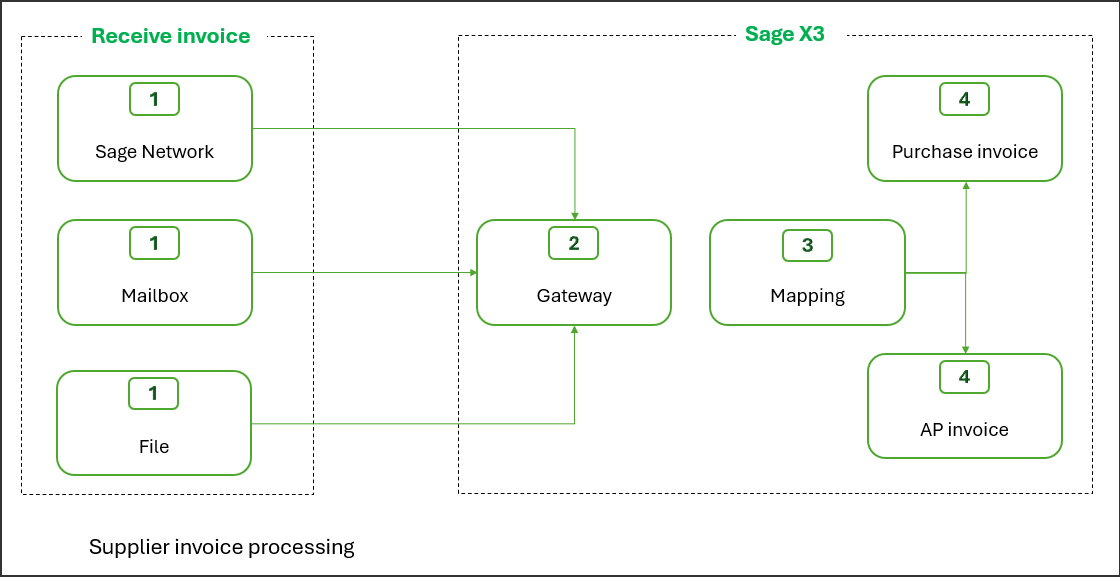
Supplier invoice processing (Germany)
- The document, such as an invoice or a credit memo, is sent by the supplier via the Sage Network or as an attachment to a dedicated email address.
- The document passes through the inbound gateway and is processed according to its file type and origin:
- Attachments are extracted from emails.
- XML files are extracted in a hybrid format such as Facture-X or ZUGFeRD.
- Optical character recognition (OCR) is used for PDFs and images.
- Header and footer information in structured XML files are parsed.
- Header information, like supplier name, site, and so on, are mapped data in Sage X3.
- The supplier e-invoice is generated in the relevant module, Purchasing or A/P-A/R accounting.
Receive invoices from Sage Network
Open: Declarations > E-invoicing > Receiving > Collect invoices
The functionality mentioned in this section is specifically for supplier invoices received through Sage Network. At this release, it applies to the French legislation.
Get inbound invoices
Use this function to collect supplier invoices received in Sage Network that have not yet been synchronized with Sage X3. You can define a set of criteria to filter invoices to collect and you can set up a batch task to run the process on a regular basis.
Display inbound invoices
Use this function to display supplier invoices collected with Get inbound invoices. It is intended for administrators to view details for collected supplier invoices such as:
- The origin and details like supplier name, recipient, amounts, and so on.
- The partial parsing results performed by Sage X3 before the transaction was created in the import buffer.
Supplier e-invoice mapping
Open: Declarations > E-invoicing > Receiving > Supplier e-invoice mapping
The objective of this function is to drive, when possible, the automatic determination of the Sage X3 data from the XML. For example, the determination of the Sage X3 supplier from the supplier’s name, tax ID, or the EU tax number.
Remember that this process assumes that inbound e-invoices were collected by Sage X3 from Sage Network.
For each inbound e-invoice, Sage X3 creates a record in the temporary table using properties parsed from the XML file using the XML designer. The initial status is To be mapped.
The standard process is not completely automated. The objective is to initiate the creation of the invoices, in the relevant module, with their header and a generic line. You need to complete the transaction using the current process. For AP invoices, allocate amounts to different accounts and/or dimensions. In the Purchasing module, reconcile with receipts, orders, or invoices.
If the mapping is not successful, the record status of the record changes from To be mapped to Incomplete mapping, and you need resolve the issues. If the mapping is successful, either completed automatically or manually, the record status changes to Mapped, and the record is ready for the next step, which is creating the invoice in the relevant module.
Mapping rules
Mapping rules rely on the following information, which is required to create the e-invoice.
| Property | Determination |
|---|---|
| Electronic address | Electronic address of the invoice sender and recipient, extracted from the XML file. |
| PO number | Directly extracted from the XML file header. If the purchase order is found in the Purchasing module, it enables automatic determination of the company, site, and supplier. |
|
Company |
Sage X3 code from the company name, the tax ID and the EU VAT no. in the XML file. |
|
Site |
Sage X3 code the site name, the tax ID, or the EU VAT no. in the XML file. |
|
Supplier |
From the supplier name, the tax ID, or the EU VAT no. in the XML file. |
|
Module |
From settings associated with the supplier. |
|
Date |
Date record was created in the temporary table. |
|
Currency |
Retrieved from the ISO code in the XML file. |
|
Invoice type |
From the supplier invoice type. |
|
Supplier invoice date |
Directly parsed from the XML file. |
|
Supplier invoice no. |
Directly parsed from the XML file. If the invoice already exists in the Purchasing module, invoice creation is blocked. For intercompany transactions, the invoice is linked to the Sage X3transaction, and its creation is blocked. If the amounts do not match, you need to take action. |
|
Tax excl. amount |
Directly parsed from the XML file. |
|
Tax amount |
Directly parsed from the XML file |
|
Tax incl. amount |
Directly parsed from the XML file |
You can define how duplicates are managed. For example, 2 different suppliers in Sage X3 match identifiers in the XML, you can accept the first result the system finds or trigger an error.
Supplier e-invoice generation
Open: Declarations > E-invoicing > Receiving > Supplier e-invoice generation
The inbound e-invoice process, from the retrieving of e-invoices from the Sage Network up to creating e-invoices, rely on the temporary tables. First, you select the e-invoices you want to see and act on.
You can:
-
Get lists of e-invoices and access to the attached documents.
-
Complete the mapping if not done.
-
Trigger the generation of the invoices. For this generation, the import/export templates used are EINVBISIMP for AP invoices, and EINVPIHIMP for Purchasing invoices.
You can restrict access to a subset of sites and/or companies using the standard functional rights. The generation of the invoices can be run manually or automatically using recurring tasks on a custom schedule. Only e-invoices that are fully mapped are processed.
Refuse an e-invoice
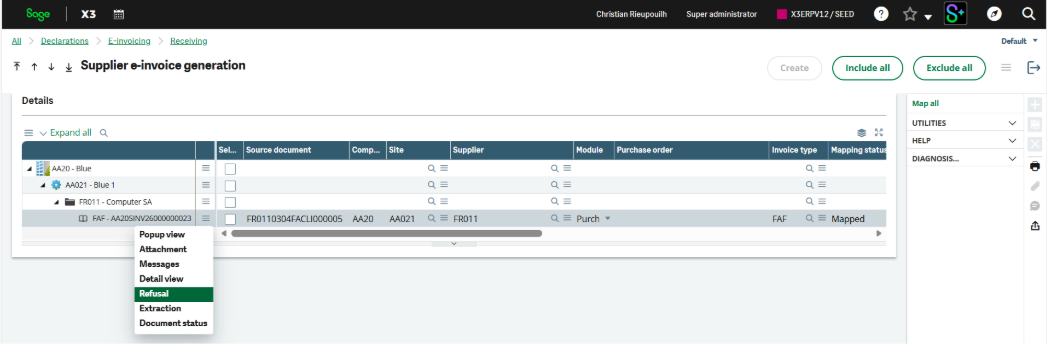
You can review and refuse a supplier e-invoice that has been mapped in the Supplier e-invoice generation function but has not yet been created in Sage X3.
To refuse an e-invoice, use the Refusal action on the line of the invoice you want to refuse.
Manage intercompany invoices
Intercompany invoices are automatically generated by mirroring a sales invoice with a purchase invoice between two companies. When the sales invoices is validated, the purchase invoice is created.
To prevent duplicate purchase invoices when receiving a sales invoice, this flow is intercepted in the inbound system based on the order reference and blocked there. The purchase invoice reference is entered into the system for traceability