
Generate Entries
The Generate Entries function, along with the FYs/Periods creation function, is used to add a ledger in a template being used. More precisely, running this utility triggers, for the new ledger, the creation of entry lines on the entries to be posted.
Before running the function, it is necessary to carry out various updates in a group of setup functions:
- consequences of the update of parameter LEDTYPAUT - Automatic Ledger Type (TC chapter, MIS group),
- update of the template,
- update of the Company parameters attached to the concerned template (fiscal years and periods, invoice entry transactions...),
- management of the attached new analytical dimension types, dimensions and data (propagation rules...),
- management of the ledger addition at the level of the entry lines,
- manual update of the opening balances,
- update of the accounting and analytical data of the new ledger in documents that have not been posted and/or balanced yet.
 The ledger added and managed by the utility can only be a manual ledger.
Prerequisites
Adding a new ledger: method of operation
It is recommended to perform the various actions in the order described below.
1 - Update the LEDTYPAUT setup 'Automatic ledger type'
The utility only manages the addition of a manual ledger. Therefore, the number of ledgers declared as automatic may need to be updated in the LEDTYPAUT parameter. Thus, the new ledger will be displayed in some parameters.
Entry types
For each entry type, the tab that lists the folder's manual ledgers makes it possible to specify if the ledger must be filled systematically, optionally or not at all. If adding a new ledger involves the extension of the LEDTYPAUT parameter, the new ledger will be displayed in the grid with the authorization default value 'Authorized'.
The user must check, including modify, the status entry type by entry type before launching the utility recovering the new ledger type on entry lines.
For some specific processes (year-end carry-forwards, matching variances or conversion variances, ...), it can be necessary to create new types of single-ledger entries (for this new ledger).
Journal entry transactions
For entry transactions referenced in Column entry transaction and Line entry transaction parameters, the 'Ledger type' grid is updated automatically. On the contrary, it is compulsory to enter these two transactions in modification mode, save them and re-validate them. The update of this grid can be done manually for entry transactions that are not referenced in these two parameters, if need be.
Entry transactions of the Purchase module
For each entry transaction of the Purchase module, the ledger type grid contains all the ledgers of the local menu 2644 'Ledger type'. Each automatic ledger has a 'Hidden' mode that cannot be modified. A ledger can be set as manual, therefore, the 'Hidden' mode can be reached and modified if necessary.
2- Update of the template
Manual updates of general structure elements
- Chart of accounts creation,
- Chart of accounts creations / updates with propagation rules,
- Dimension types creation,
- Analytical dimensions creation,
- Ledger creation.
Template manual update
- New ledger line setup,
- Controls block update.
Adding a ledger not concerning all the companies of a template
A template can be common to several companies. Therefore, these companies might all benefit from the adding of a new ledger type.
Remember, the link between a company and an accounting template cannot be deleted.
To add a ledger on one or several companies of a template but not all of them: duplicate the template and modify (only) its code. Once the duplication is complete, the new template must be reassigned to the company. Each template can then potentially benefit from a new, identical or different, ledger.
3- Company data update
Company & Site Records
If a ledger with dimension types is added, the new ledger's dimensions are loaded in the 'Accounting' tab of the involved companies and sites' records. The user may have to update the Dimension types field of the companies and sites' records and theCompulsary and Upstream entry fields of the company record.
Fiscal year/periods by company update
Fiscal years and periods must be created for all 'company/new ledger' combinations referring to the updated template.
Invoice entry transactions by company update
The ledger types grid is updated, in a context that does not disturbing the entry (the new ledger is not displayed). The user is free to set up (or not) the account entry for the new ledger as well as the order number.
4 - Necessary data for the propagation of the new ledger update
Update of the default dimension types
If the new ledger contains new dimension types, thedefault dimension types must be updated manually for each entity:
- the utility application relies on the default dimensions setup - specified in the entry transaction of the entry - so as to initialize the dimension types of the new ledger in the entry lines,
- new dimension types can be initialized when creating new documents once the ledger is added.
Dimensions linked to the new dimension types creation
The new dimensions must be updated by means of an entry or import.
Adding default dimensions and new dimension types in basic data
The new default dimensions must be added in the various basic data (customer, supplier, taxes...) where the new dimension types have been declared.
Adding default dimensions and new dimension types in new dimensions
The new default dimensions must be added to the new declared dimension types.
This is particularly important if, in the accounting template, the balancing option is set as 'Balance with rounding discrepancy' and if one of the new dimension types is set as required and/or if the new ledger has the option 'At least one dimension type must be entered'.
Adding default dimension types in the Journal entry transaction setup
The new default dimensions must be added in theJournal entry transactions. Indeed, when the entry lines of the new ledger are added to the previous entries, the new ledger's dimension types are initialized according to the default dimensions setup specified in the entry transaction of the entry.
Default dimensions setup update so as to include new dimension types
The default dimensions set up attached to the Journal entry transactions are used to specify the loading rules of the dimension types when adding the ledger. In the entry lines and documents created previously upon addition of a new ledger, the codes and rules for populating new dimension types must be updated in the default dimensions setup. The dimension code by default attached to an entry transaction must not populate dimension types other than the ones defined in the additional ledger.
New chart of accounts creation
The accounts must be updated and the propagation rules must be reviewed so as to allow a specific loading of the new ledger. The dimensions and dimension types of the analytical accounts can be updated manually or via the "Default dimension types" tab of the Chart of accounts.
Required status of a dimension type linked to the added ledger
When launching the ledger addition utility, all standard controls of the document entry are triggered.
In the case of an existing analytical ledger, when an optional dimension type becomes mandatory, some entries can be set with no dimension for this particular type. When adding a new ledger, since standard controls are applied, the dimensions missing for this type are considered as a defect.
It is therefore necessary to set it back to its optional status temporarily before launching the ledger addition utility.
Partner and flow initialization when adding a ledger
When only the added ledger has consolidation management selected:
The partner and flow initialization is run for the new ledger.
The partner and flow control is run for the new ledger.
When the added ledger is not the only one with consolidation management selected:
The initialization is not run.
The control is only run for the new ledger.
Read the documentation for Partner initialization and Flow initialization.
Screen management
Functioning
For a manual ledger, the utility application for entry generations reads the entries of the transaction (which determines the propagation via the presentation order of ledger types). The propagation is done considering the accounts and entry types setup.
The utility does not launch the balance update. The balance update must be launched via the Balances, Dimensional balances and Quantities Dimensional balances resynchronization utilities.
Management of particular cases
Final entries
When an entry becomes final, a chrono number is assigned to this entry (one number per line). This is a guarantee that no line has been canceled or added (as the numbers are created in chronological order).
On the accounting chrono, a component considers the ledger type. Each ledger type has its own number sequence. Adding lines to a new ledger will not disturb the number sequence. There can be a break in the number sequence if there is no 'Ledger type' component.
For example:
A sequence number linked to Company no.1 with two manual ledgers:
|
Main general ledger |
Entry 1 |
Sequence number |
|
Social ledger |
Line 1 |
01: |
|
Social ledger |
Line 2 |
02: |
|
Analytical ledger |
Line 3 |
03: |
|
Analytical ledger |
Line 4 |
04: |
After adding an IAS ledger:
|
Main general ledger |
Entry 1 |
Sequence number |
|
Social ledger |
Line 1 |
01: |
|
Social ledger |
Line 2 |
02: |
|
Analytical ledger |
Line 3 |
03: |
|
Analytical ledger |
Line 4 |
04 |
|
IAS ledger |
Line 5 |
201 (2=ledger type and 01 chrono number) |
|
IAS ledger |
Line 6 |
202 (2=ledger type and 02 chrono number) |
Specific fiscal year end entries
The ledger can only be added from the first fiscal year that is not closed.
The entry generation process must start from the first fiscal year with an opening balance. This balance must be entered (via direct entry or import) for the new ledger. There are two possibilities for the process, depending on the precedence choice and the recovery mode of carry-forward entries.
For instance, if it starts from 01/01/N-4 and the first fiscal year is created on 01/01/N-4:
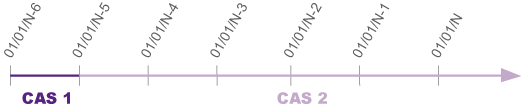
- CASE 1: Addition of a ledger for all previous fiscal years with an addition choice, starting from FY N-6. The opening balance must be entered for this new ledger with an single-ledger entry type (new ledger). Each fiscal year must be closed and the new ledger addition Utility must be launched after each opening balance entry or generation.
- CASE 2: Addition of a ledger for all previous fiscal years with a recovery choice, starting from FY N-4. Two solutions are possible:
- FY N-6 must be closed with no utility launch for the addition of entries on FY N-6.
The closing balance of FY N-6/opening of FY N-5 is entered on 01/01/N-5 and FY N-5 is then closed for this new ledger type. This makes the opening balance of FY N-4 available. The utility can then be launched for the addition of the ledger on FY N-4, N-3, etc. - FY N-6 and FY N-5 are closed without recovering entries. The FY N-4 opening balance is recovered via entry or import on the 01/01/N-4 for a single-type ledger entry type (new ledger). The utility application can be launched for adding the ledger.
Matching and conversion
- Matching block
Each time the added ledger is checked matchable, and each time entry lines are added to the new ledger, the matching code of the main general ledger lines is recovered in the Free reference zone of the new ledger type lines. - Conversion variance
After each new FY begins and before the closing of a FY on which a ledger has been added and the matching is restored, it may be necessary to launch the calculation process of the conversion variances.
Analytical Commitments Update
The new ledger type is not added for the existing commitments before its addition, even though it is checked as Commitments.
As a consequence, when an order is attached to an invoice that has been entered before, during the order's preloading in the invoice, no de-commitment will be generated in the new ledger type (as long as no commitment has been created before).
Addition of a ledger using a dimension type common to another ledger
On the accounting model of a company, if you add a ledger using an analytical dimension type similar to the one of another ledger of that same model: the utility will recover, for this new ledger, the analytical dimension allocated to the ledger with the same dimension type (default dimensions are not used in this case).
Amounts management
- At the utility setup level, you can choose to recover the amounts of the new ledger from the existing ledger.
This is possible if, at the level of the account core model setup, the recovery ledger has the same currency properties as the added ledger: the ledger currency, the document exchange rate type and the rate entry must be the same in both ledgers. - The exchange rates of the new ledger are then exactly the same as the ones of the given recovery ledger.
- When amounts are forced on accounting entry lines, these amounts are kept as such.
- When no amount is forced on entry lines, amounts are not kept but calculated.
The conditions for recovering the documents amounts in the new ledgers are summed up in the following table (EUR used in the example as the currency of both the new and recovery ledgers):
|
Account Core Model |
Accounting entry |
||||||
|
Currency of the ledger |
Doc rate type |
Exchange rate type |
Recovery ledger |
Currency of the recovery ledger |
Transaction currency
|
Currency of the new ledger |
Amount of the new ledger |
|
EUR |
Yes |
Social |
EUR |
USD |
Recovering rates of the social ledger |
- If the recovery ledger amount is forced: recovery of the forced amount (AMTLED1) and ledger amount (AMTLED). |
|
|
EUR |
No |
Average rate |
Social |
EUR |
|||
- If no ledger meets these conditions, or if you do not wish to have amounts recovered from the given ledger, then the documents' amounts in the new ledger will be calculated. The conditions for determining the rates used in the new ledger are detailed in the following table:
Account Core Model | Accounting entry | |||||
Currency of the new ledger | Doc rate type | Exchange rate type | Transaction currency | Other ledger of same rate type (TYPRAT) | Currency of the new ledger | Amount of the new ledger |
EUR | Yes | USD | YES | Recovery of rates already present in the document header (HAE) | Material | |
USD | NO | Loading based on the document rate type (TYPRAT) and rate date (RATDAT). | Material | |||
EUR | No | Average rate | USD | YES | Recovery of rates already present in the document header (HAE) | Material |
USD | NO | Loading based on the account core model rate type and document rate date (RATDAT). | Material | |||
Entry screen
Criteria
| Company (field CPY) |
Company concerned by the entry generation on the new ledger type. |
| Ledger type (field LEDTYP) |
New ledger type, concerned by the entry generation. |
| All document types (field ALLTYP) |
If this box is ticked, the mass entry generation is launched on all journal types (if the new type of journals is authorized). |
| Entry type (field TYP) |
Enter a journal type to launch the entry generation for a given journal type. |
| Start date (field STRDAT) |
Enter an accounting date range within which entries are taken into account. The period concerned by the execution process can differ from that of the fiscal year/period of the concerned Company.
|
| End date (field ENDDAT) |
| Amounts recovery ledger (field FLGAMT) |
Check this box to indicate that the amounts of the generated ledger must be taken from an existing ledger specified in the Ledger type field. If the setup of the account core model is not relevant (i.e. does not include at least one ledger with these characteristics), the fields will not be available. The terms for recovering amounts depending on the various setup types are detailed in the function documentation Generate entries. |
| Ledger type (field LEDTYPAMT) |
This field can only be entered if the Amounts recovery ledger checkbox is selected. |
Generation
| Simulation (field SIM) |
A simulation mode can be launched in order to extract the list of detected anomalies. |
Specific Buttons
Recall | Click this action to enter a Memo code to load the settings associated with the code. |
Delete Memo | Click this action to delete a Memo code. |
Error messages
The only error messages are the generic ones.